

Investigating Suspicious Activity on PaperCut Servers
You may have noticed the news about PaperCut, or the security advisory published by PaperCut on 27 August 2026, which mentions two CVEs affecting PaperCut NG and PaperCut MF.
During my daily activities as a SOC analyst, I detected activity involving PaperCut servers being actively compromised.
Detecting suspicious process trees
A key detection opportunity is a suspicious process tree: pc-app.exe spawning cmd.exe or powershell.exe and executing malicious commands. The commands may differ each time, but they are consistently suspicious. PaperCut software should not be trying to create a new user, dump registry hives, or perform enumeration.
During my investigations, the process tree raised concerns:
services.exe
└── pc-server.exe
    └── pc-app.exe
        └── cmd.exe
cmd.exe was leveraged to execute additional enumeration, lateral movement, and persistence commands: whoami.exe, net.exe (net user), reg.exe (reg save), and so on.
Following this activity, I knew I had to investigate deeper and obtain related artifacts.
In this blog, I will cover the PaperCut MF version, which provides print management with copier integration. For the PaperCut NG version, which provides print management only, simply replace MF with NG in any directory paths.
Down the rabbit hole we go
First stop: PaperCut server logs
Depending on whether you are running MF or NG, the path is different. This can be identified during execution because it is captured within the pc-app.exe and pc-server.exe process paths.
For MF, look in:
C:\Program Files\PaperCut MF\server\logs\server.logFor NG, look in:
C:\Program Files\PaperCut NG\server\logs\server.logOnce opened, match the execution timestamp with the captured logs. You should be able to recognise a rather long hex-encoded string, usually starting with the cafebabe string.
 🔍 Click image to enlarge
Captured hex-encoded command, which can be decoded using CyberChef or another similar tool of your choice.
Search for Base64- or hex-encoded commands in server.log. A quick win is to search the server.log file for the VALUES CAST string, identify the hex-encoded code, and decode it.
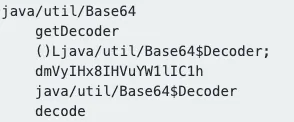
Decoded hex command, showing the Base64-encoded command.

Decoded hex command, showing a reference to the .txt file within the web directory.
Next step: Recent file creation
Decoding the hex value may uncover more indicators of compromise dropped on disk, generally as .class files within:
C:\Program Files\PaperCut MF\server\lib\Again, you will have to adjust this for the NG version.
Search this directory for newly created .class files. These are compiled Java bytecodes used by threat actors to execute arbitrary commands on the compromised server. I encourage searching for newly created .class files even if server.log does not have any hits.
The .class files should contain the same content as the hex-encoded command. During the attack, the threat actor may drop multiple .class files, which will be associated with the hex-encoded commands.
When reading the contents of .class files or the hex command, search for Base64-encoded commands and references to other files, such as .txt files dropped within:
C:\Program Files\PaperCut MF\server\custom\web\String-searching for custom/web/ or Base64$Decoder can uncover these more quickly, as highlighted in the screenshots above.
If no .class files are detected, it is still worth searching for newly created .txt files within the web directory:
C:\Program Files\PaperCut MF\server\custom\web\These .txt files will most likely contain the output of the cmd.exe commands that were executed.
In even luckier cases, a .conf file is dropped during the attack. This can contain additional indicators, such as the host IP address and port number used by the threat actor for the C2 channel.
Correlating the evidence
Aligning all of the above during the investigation is the key point. Correlate the timeline of executed commands with the timeline of hex commands in server.log, keeping in mind that time zones may differ, and with files dropped to disk. You may find only one indicator, or none at all.
The command line may uncover the temporary paths used during the attack for staging data for exfiltration or dropping additional files, such as:
C:\Windows\TEMP\What matters is determining whether this is expected activity for a PaperCut executable. Ensure the version number is running the latest patched release listed in the PaperCut security advisory, or ensure the PaperCut server is not publicly exposed until you are able to install the patch.